
CDR Reporting
The Atomic platform provides users with real time access to their call records directly on the portal.
🧭
Navigate: Reporting > CDR
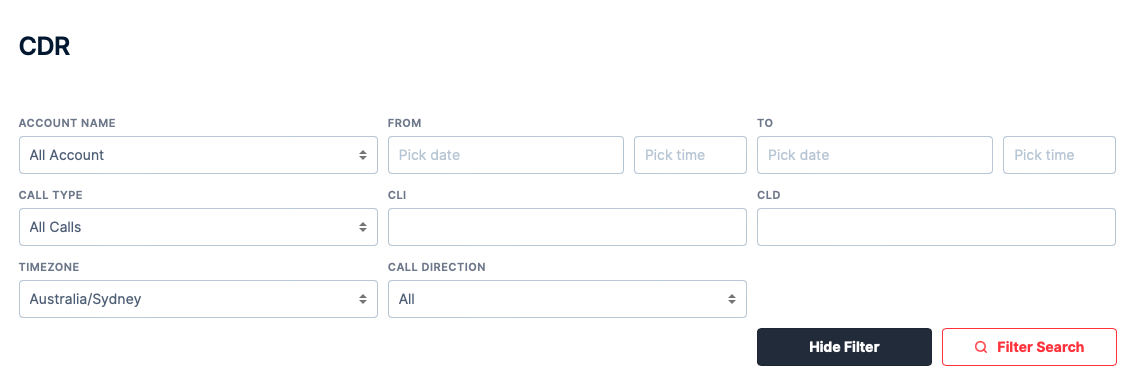
The 'Search CDR' toggle will allow you to filter CDR's, depending on what you are looking for. Below is some key definitions that may not be as obvious:-
Account Name - By default, it will show CDR's of all your account. You can select CDR's from a specific Account only should you choose to do so.
CLI - This is the caller's number. You can use this filter to search CDR's based on a specific CLI. You can also use a
% as a wildcard. So searching for %0737 will search for all numbers that end with 0737. Searching for 61403% will search for all numbers that starts with 61403.CLD - This is the number that the caller called. You can use this filter to search CDR's based on the called number. You can also use a
% as a wildcard. So searching for %0737 will search for all numbers that end with 0737. Searching for 61403% will search for all numbers that starts with 61403.Call Type - By default, the selection is
All Calls. This will display all attempted and connected calls. Non Zero Duration Calls will display calls that was connected that has a duration. Zero Duration Calls will display all calls that do not have a duration.Call Direction - You can search for CDR's for a specific direction - whether for
Incoming or Outgoing or All.Download CDR - This will download the CDR based on your search criteria. The file output will be in .csv format.