
Odoo Cloud
This integration connects your Hosted Voice with Odoo CRM using XML-RPC protocol, allowing call data to be automatically logged in Odoo. The integration creates and updates contacts, logs calls as messages and associates call information with existing CRM leads and helpdesk tickets.
💡
TIP
It is important that telephone numbers in Odoo are stored in the format that the PBX uses, which is in E.164 (eg. 61234567890). This is because telephone numbers need to match exactly in ActiveCampaign.
Requirements
- You will need your Odoo URL, database name, username, and password. Make sure the user has the necessary permissions for the Contacts, CRM, and Helpdesk modules.
Integration Setup
- On the Hosted Voice admin portal, navigate to Integrations then select Odoo Cloud. Here, you will configure your Odoo credentials:
- Enter the URL for your Odoo instance.
- Provide your Odoo database name.
- Enter your username (this is usually your email address).
- Input the password for that user.
Odoo Cloud integration settings with the Odoo API Key field filled in and Update button visible - Once successfully connected, calls will be displayed in Odoo.

Odoo contact record showing outgoing call activity logged automatically in the chatter after a conn… 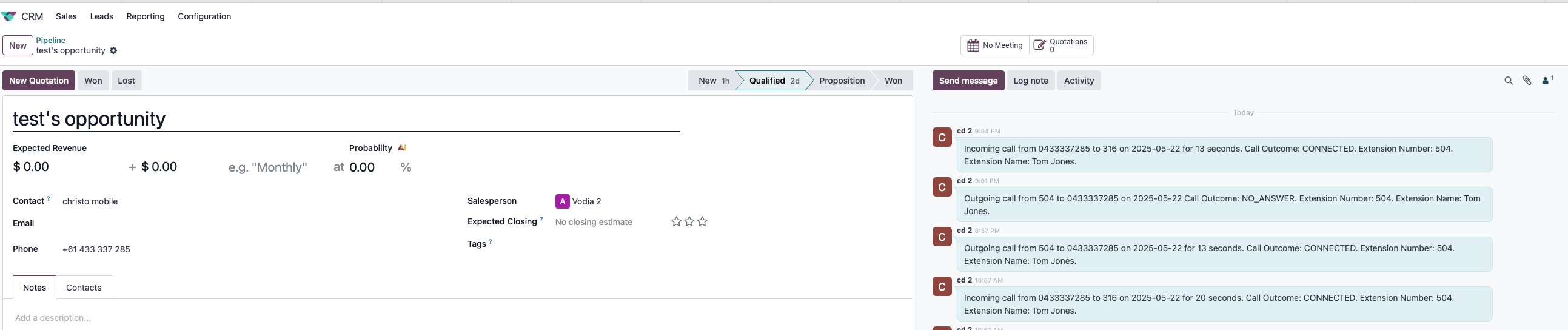
Odoo CRM opportunity record showing inbound and outbound call logs populated after a successful hos… 
Odoo Helpdesk ticket showing incoming and outgoing call logs populated after a successful hosted vo…
Integration Features
- Automatic contact creation and matching
- Call logging in contact records
- Integration with CRM leads and opportunities
- Integration with helpdesk tickets
- Support for outbound, inbound, and voicemail calls
- Call outcome and duration tracking